Inklingo FAQ
March 2026 – This page is being updated for the Inklingo Quilt Studio.
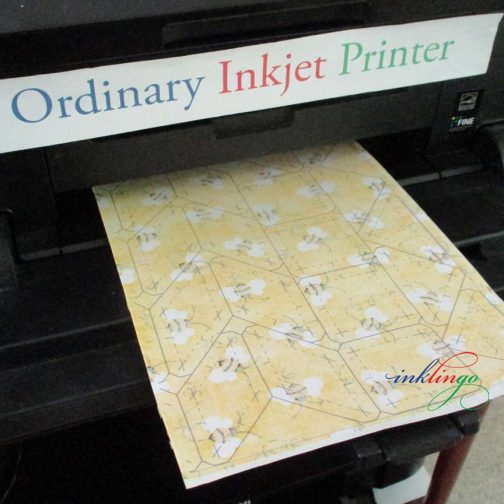
Good news! ANY ordinary color Inkjet printer with any ink is fine for Inklingo.
Thanks to Inklingo Test Pages, you can buy a printer based on your primary need, and it will be fine for Inklingo. If Inklingo is your primary need, you can just choose whatever is on sale.
TIP When I was looking for a new printer (2017), I called Canon Support for Canada (where I live) and they were able to tell me which model used the same ink cartridges. That was very helpful because I had leftover ink I wanted to use up. They also amazed me by telling me which store near me had the model I wanted on sale (Staples) at that time. I was very impressed. (No affiliation.)
The Inklingo Quilt Studio makes it easy to use your printer for Custom Page Sizes. It allows us to use our fabric efficiently.
Print a Test Page every time you install a new ink cartridge, so you know which colors will not bleed or so on the front of the fabric. (In many cases, all 20 are suitable.)
A Printer to Build a Dream On
I hear different lyrics when I listen to some of my favorite songs. Enjoy!
Give me a kiss to build a dream on
Print me some lines to build a quilt on
And my imagination will thrive upon those lines
Monkey, I ask no more than this
The lines to build a quilt on
Print me some shapes before you leave me
And my imagination will feed my hungry heart
Print me some fabric before we part
The lines to build a quilt on
When I’m alone with my fabrics
I’ll print with you
Planning more quilts
Making believe they’re true
Turn on your printer for a moment
And my imagination will make that printer hum
Print what only Inklingo can give
The lines to build a quilt on
I do NOT recommend using a laser printer for Inklingo, although some quilters do use them for Inklingo.
A laser printer uses toner, not ink, and it uses heat. If you put fabric and freezer paper into a laser printer it can ruin the printer because the plastic coating on the freezer paper can melt and create a mess that cannot be repaired.
If you decide to risk it, please be sure to follow the instructions to print test pages, so you know which colors of toner do not smear or show on the front. Toner is not the same as ink.
Luckily, you can probably pick up a Canon Inkjet on sale for less than $50. (You would want to spend more if you want to print photos.) You can have more than one printer connected to your computer at the same time. Inklingo uses a tiny amount of ink, so if Inklingo is your primary use for the Inkjet, the ink will last a long time.
Please let me know if your question is not answered here. My address, email, and phone number are on the Contact page in the footer of every page.
I can be reached anytime through my website or Facebook (email preferred).
There is a friendly Inklingo group on IO (previously on Yahoo) where you can meet other Inklingo quilters and ask questions.
Getting Started
Please order the free shape collection first from the Main Beginner’s Page and print your first sheet of fabric!
The easiest way to learn how to print with Inklingo is by actually printing.
I sometimes hear from quilters who say they were “overthinking it” and wish they had just started printing sooner. There are links to step-by-step instructions and more free tutorials in my Welcome email. (Online version)
Not intended to be re-sized!
Inklingo files are PDFs (not software like Electric Quilt), so the shapes are not intended to be re-sized.
I draw the shapes to a precise size, like 1.32-inch in the free Diamond Triangle Square shape collection.
Some printers have software that allows you to re-size the layouts by a percentage, but that also re-sizes the seam allowances, which makes the sewing awkward (sometimes impossible). None of the suggested custom page sizes or yardage requirements would work either.
Inklingo shapes are named with the finished size to make it easy. You can see all of the shapes that are available in the Index of Shapes under the Support & Goodies tab.
If you want to make a 6 or 9-inch or 12-inch Star block, you can see some of the choices on the Stars Page.
There are several sizes of hexagons on the Hexagon Page.
You might want to see the short tutorials under the Top 10 Tutes tab on the blog.
Index of Shapes (under Support)
The Smart Shopper’s Idea Book (under Support)
List of Shape Collections (under Support)
List of Main Shop Pages (under Shop & Freebies)
You can also use the Search box at the top of every page.
Many Inklingo shape collections are the result of requests from quilters like you. Let me know what you want! Linda @ LindaFranz.com
Whenever you forget your password, you can get a new one on the My Account page.
If you do not receive an email immediately, please check your spam or junk folder. If you still cannot find it, email me. [email protected] I am happy to help.
Printing Issues
Jams should be very rare if you use fabric that has been washed and press it to the freezer paper with a hot, dry iron.
There are at least 8 good ways to avoid jams.
I am happy to help with suggestions too. [email protected]
Opening Inklingo PDFs
Please write to me at [email protected] and I will change it for you.
Yes. Inklingo works on Mac.
The CDs with Shape Collections # 1, # 2, and # 3, (2006 and 2007) are not Mac compatible.
Yes! The new Inklingo Quilt Studio for iPad makes it easier than ever to take your quilting with you wherever you go! There is also a version for Android tablets, of course.
Dial-up Internet connections are fast and effective for activating Inklingo PDFs. Inklingo files are often 30 MB or more so they will take longer to download on a slow connection.
It may be easier to download late at night (or overnight) when there is less traffic. Download time will vary depending on the speed of your modem, Internet traffic, and your Internet provider (ISP).
You can download the Inklingo PDF onto a computer with a faster connection, copy it onto a thumb drive or CD, and then copy it onto the desired computer. It does not matter which computer you use to download, but be sure to only open on the computer you want to use for Inklingo.
Even if you copy the files onto your computer from a thumb drive or CD, you will need to go online to activate the first time. Activation only takes a second, so a slow connection is not a problem.
Terms & Conditions
When you order and check out with Inklingo, you must agree to the End User License Agreement (EULA). It is one of the questions in the shopping cart.
In plain language, each license allows one quilter to download and activate the collection on two computers (home and work, or desktop and laptop, etc). The license is not transferable, so it cannot be shared or re-sold and is for personal use only.
If you want to use Inklingo for commercial purposes, I am happy to help. Please contact me.
When you get a new computer, you can use your second activation. If you have already activated Inklingo on two computers, you may need to contact me for permission to deactivate one computer and activate the new one.
When you download the Studio to your new computer, you will see all of your Inklingo files. It’s as easy as can be.
I’m sorry if you have a crash but Inklingo makes it as easy as possible to recover Inklingo.
When your computer is fixed, all you need to do is download the Studio again. Nothing is lost. (There is never any need to keep a backup.)
Payments & Postage
All prices are in US dollars, even though I live in Canada.
Your credit card company will convert the US dollar amount to your local currency (Australian dollars, British Pounds, Euros, Canadian dollars, etc) on your statement.
Payments are processed through Stripe (previously on PayPal).
The site is secure (https) but for added security, no payment info is entered or stored on the website. That means you must enter your payment info every time you order. For me, the extra security is worth this small inconvenience.
If you prefer to send a check or money order (payable to Linda Franz), please check out with the shopping cart to determine the total with postage.
Please be sure to use enough postage when you mail your check. Postage for a letter from the US to Canada is more than it is within the USA.
Linda Franz
2040 Watson Dr
Burlington ON L7P 0R2
Canada
Canadians may send cheques in Canadian dollars, but please write to me first, so the amount can be converted from US dollars. All other checks must be in US dollars.
Thank you!
I am in Canada but I send orders by Priority Mail from the US Post Office in Niagara Falls NY (USA). Orders are almost always shipped within 48 hours (except for Sundays and holidays). Postage info.
If you are concerned, please do not hesitate to write to me about your order.
CDs, DVDs and Electric Quilt
Inklingo does NOT require Electric Quilt or any other software.
The downloadable collections use Adobe Reader (free). It used to come pre-installed on most computers, so it was ideal when I introduced Inklingo in 2008.
EQ is not required but many Inklingo quilters use it to design their quilts and then print the shapes on fabric with Inklingo. There are dozens of free project files on the blog.
Eventually, all CDS will be obsolete, just like VHS tapes and floppy discs.
So far, many quilters have been able to use the old CDs (2006, 2007) on newer versions of Windows up to Windows 10. (They have never worked on Mac.)
If the CDs do open for you, they will be slow and do not have the Custom Page Sizes and yardage info which I include in the downloads. Many quilters have bought the same shapes as downloads to get the better version.
The first three Inklingo shape collections were published on CDs in 2006 and 2007. They have been sold out for many years. CDs are old technology. Most new computers do not even have a CD drive anymore.
I have not heard from any quilters who could not open the Inklingo CDs on Windows 10 but they have to ignore a few warning dialog boxes.
If you copy the file onto your hard drive and try to open it without the Inklingo CD in the drive, it will not work.
If the CD does work, you may have to wait several minutes for the file to completely open.
UPDATE OCTOBER 2013 Two quilters have reported that they cannot open the CD on Windows 8 when they follow the special instructions below. MANY quilters have been able to open the CD with Windows 10, but if you have Windows 10, please buy a download instead.
SPECIAL INSTRUCTIONS FOR WINDOWS 7 AND 8 AND 10
The #3 CD will open in Windows 7 and Windows 8 if you open it with the version of Adobe Reader provided on the CD and not the version on your computer (Adobe Reader X or XI). It is necessary to ignore the compatibility warnings.
1. Close Adobe Reader if it is open already.
2. Insert the CD.
3. Choose Run LAUNCH.exe.
Keep an eye on your taskbar (bottom of the screen) to see if an icon is flashing there waiting for a response.
4. Choose Yes.
This will open the older version of Adobe Reader which is included on the CD.
This dialog box should show on top of other open windows, but keep an eye on your taskbar (bottom of the screen) to see if an icon is flashing there waiting for a response.
5. Choose Run Program.
This dialog box should show on top of other open windows, but keep an eye on your taskbar (bottom of the screen) to see if an icon is flashing there waiting for a response.
6. Wait.
The PDF file is very large and it may take up to 2 minutes to open with a slow CD drive. (This is not common.) The password will load automatically. (Even I do not know the password.)
The good news is that the downloads are faster and easier to update as technology changes.
The passwords on these old CDs (2006, 2007) are not the same as your password for Inklingo downloads.
For Inklingo # 1, # 2, and # 3, the password should launch automatically when you put the CD in the drive. (Even I do not know the password!)
The password is a necessary part of the copy protection for the CD but it loads automatically to make it as easy as possible for you, as long as you have the original CD and Windows 2000, Windows XP, or Vista.
If you try to open Inklingo with the version of Adobe Reader on your computer, it will ask you for the password. Just close Adobe Reader and re-insert the CD and it will launch with the version of Adobe Reader on the CD and it will insert the password for you—and all will be well. (If worse comes to worst, re-start the computer and re-insert the CD. It’s not likely you will have to do that.)
We have very few reports of problems with the CDs and all have been easily resolved. Re-inserting the CD has worked for almost everyone. A few others have said that when they downloaded and installed the latest version of Adobe Reader (free from www.adobe.com) that everything worked fine again. Two other people have unusual software (sophisticated copying, library download software) that they had to close (not uninstall) before an Inklingo CD would open.
Eventually, all Inklingo CDs will be obsolete, just like VHS tapes and floppy disks.
If you need more help, please ask! You can e-mail me or write to the Inklingo IO group.
The project files for Quilted Diamonds 1 and Quilted Diamonds 2 are in EQ4 format but they can be used in any newer version of Electric Quilt, like EQ5, EQ6, EQ7, and EQ8. (EQ has always made their software “backward compatible.”)
This answer was copied from the Electric Quilt website:
The Quilted Diamonds CD contains EQ projects. They are not libraries, and therefore can’t be linked.
The easiest way to use the blocks from Quilted Diamonds projects in EQ7 is to import the blocks from the project and save the blocks in My Library.
First, create a My Library space for the blocks.
Follow along on page 61 in the EQ7 User Manual.
Click LIBRARIES > Block Library.
Click the My Library section, then the Add Library button.
Type Quilted Diamonds (or some name for the library, just remember what you call it).
Start with 8 styles. (You can change this at any time if you need more.)
Click OK.
Next, you want to import Quilted Diamonds blocks into the Block Library. Be sure the Quilted Diamonds CD is in the CD drive.
Follow along on page 52 in the EQ7 User Manual.
The Block Library is still open, so click Import > From Project.
Change the “Look in:” box at the top to look in the CD drive.
Change the “Files of type:” box at the bottom to show “Previous EQ Versions.”
Select the first project and remember its name.
Click Open. This will display all the blocks in the project in the library.
Now, you need to copy and paste the blocks from the import section into the library you created.
Click one block to select it, then press CTRL+A on your keyboard.
Click the Copy button.
Click the My Library section.
Click the Quilted Diamonds library and select “Style 1.”
Click Paste.
Click Save Library, then OK.
Repeat steps 2b – 3f for the other projects. Put project 2 in style 2, project 3 in style 3, etc.
If you wish to rename the Quilted Diamonds library styles to match the projects, see page 145.
The DVD is in NTSC format but coded “region 0” to play in any country, on a DVD player compliant with NTSC standards, usually called a “multisystem” TV or DVD player.
Thanks to the region 0 code, we have heard from quilters all over the world, including PAL countries, who have been able to watch the Quilted Diamonds 2 DVD and Jane Austen’s Writing Table Quilts DVD without any problems.
If you already have Quilted Diamonds or Quilted Diamonds 2, you can buy the related CD while supplies last. Please email me for the price and postage info. [email protected]
